Forms Translator interface

Forms Translator – Unified Responses

Translate Google Forms into multiple languages and consolidate all responses into one unified spreadsheet. Auto-sync updates across all translations.

🔜 Coming Soon 🌍 Multi-Language Support 📊 Unified Responses 🔄 Auto-Sync Updates

About Forms Translator – Unified Responses

Forms Translator is a powerful Google Workspace Add-on that allows you to translate your Google Forms into multiple languages while keeping all responses organized in one unified spreadsheet. Perfect for international surveys, multilingual events, and global data collection.

Key Features

  • Multi-Language Translation: Translate your forms into any language supported by Google Translate.
  • Unified Response Collection: All responses from translated forms automatically consolidate into one spreadsheet.
  • Auto-Sync Updates: Changes to the original form automatically propagate to all translated versions.
  • Preserve Formatting: Maintains form structure, images, sections, and question types across translations.
  • Language Mapping: Automatically tracks which language each response came from.
  • Easy Management: Simple sidebar interface for managing translations and viewing unified data.

How It Works

  1. Install the add-on from the Google Workspace Marketplace.
  2. Open your Google Form and launch Forms Translator.
  3. Select target languages and generate translated copies.
  4. Share translated forms with your international audience.
  5. View unified responses - all languages combined in one spreadsheet.
  6. Update once, sync everywhere - changes propagate to all translations.

Use Cases

  • International Surveys: Collect feedback from global audiences in their native languages.
  • Multilingual Events: Registration forms for conferences, workshops, or webinars with international attendees.
  • Educational Institutions: Collect data from students and parents who speak different languages.
  • Customer Feedback: Gather product reviews and satisfaction surveys across different regions.
  • HR & Onboarding: Multilingual employee surveys and onboarding forms for diverse workforces.
  • Research Studies: Academic or market research requiring responses in multiple languages.

Screenshots

FORMS TRANSLATOR
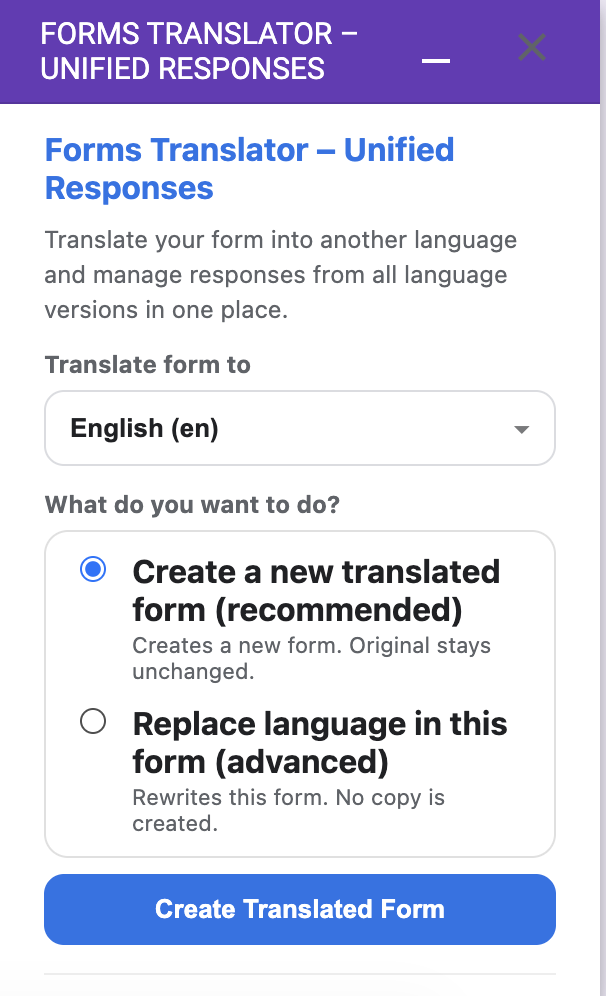
Forms Translator main interface

Main translation interface

FORMS TRANSLATOR
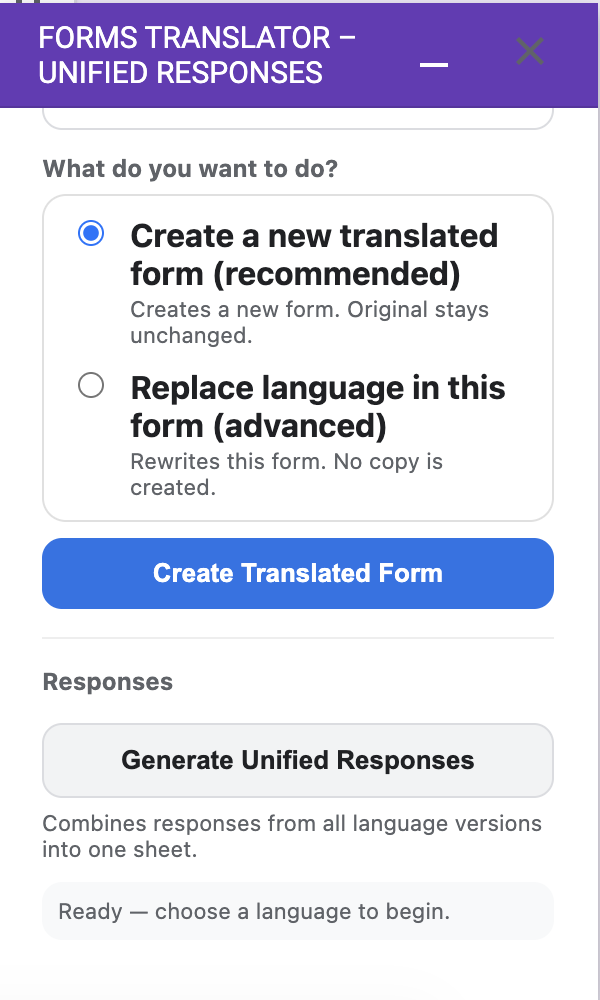
Unified responses view

All responses unified in one spreadsheet

FORMS TRANSLATOR
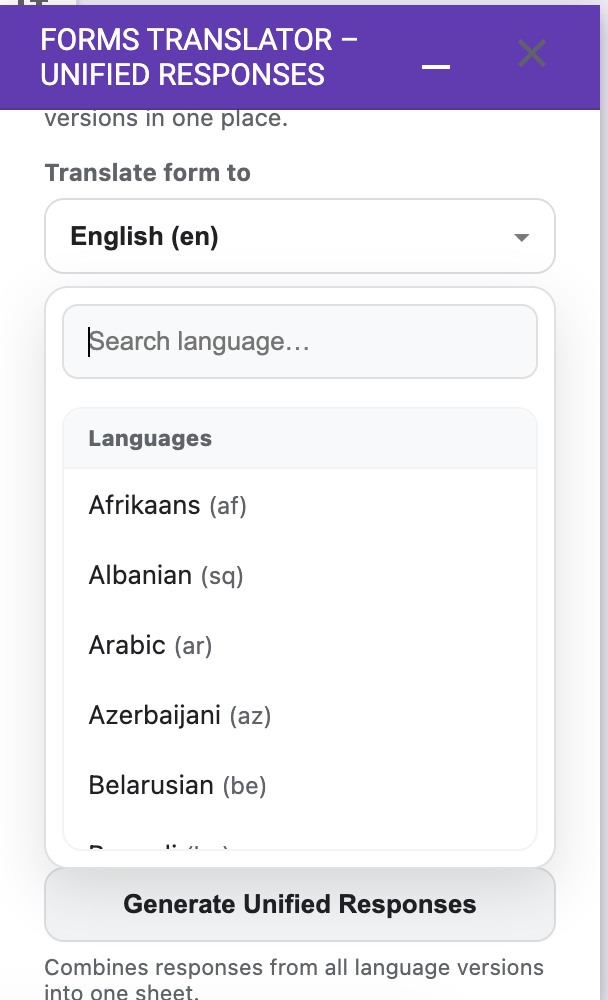
Language selection

Easy language selection and management

See Forms Translator in Action

Watch our quick tutorial on using Forms Translator with Google Forms

Policies and Terms

At Forms Translator, we value your privacy and are committed to transparency. Please review our policies below.

Privacy Policy for Forms Translator – Unified Responses

Last Updated: January 2026

This Privacy Policy describes how Bright Construct ("we," "us," or "our") collects, uses, and shares information when you use our Google Workspace Add-on, Forms Translator – Unified Responses (the "Add-on"), which is designed to translate Google Forms into multiple languages and unify responses from all translated forms into a single spreadsheet.

We are committed to protecting your privacy and handling your data transparently. This policy explains our practices in detail.

  1. What Information We Collect and Why

    Our Add-on primarily functions by interacting with your Google Forms and linked Google Sheets to translate forms and consolidate responses. We collect and access only the minimum information necessary to provide and improve the Add-on's features.

    Information You Authorize Us to Access (via Google OAuth)

    Google Forms (Read & Edit Access)

    Purpose:
    The Add-on needs access to Google Forms in order to:

    • Read the structure of the active form (questions, options, sections, images)
    • Create translated copies of the form in other languages
    • Update existing translated forms when the source form changes
    • Maintain a relationship between the original form and its translated versions

    Specific Scopes:

    • https://www.googleapis.com/auth/forms.currentonly (Access the currently open form)
    • https://www.googleapis.com/auth/forms (Create and update translated forms created by the Add-on)

    Limited Use:
    The Add-on only accesses forms that you explicitly open, translate, or generate through the Add-on. It does not scan or access unrelated forms in your Google Drive.

    Google Sheets (Read & Edit Access)

    Purpose:
    The Add-on requires access to Google Sheets in order to:

    • Read responses from translated forms
    • Store internal language mappings and configuration metadata
    • Generate unified response views (e.g., Unified Responses and Unified Form View)

    Specific Scope:

    • https://www.googleapis.com/auth/spreadsheets

    Limited Use:
    Only the response spreadsheet linked to your form is accessed. No other spreadsheets in your Google Drive are read or modified.

    Google Apps Script UI (User Interface)

    Purpose:
    This scope allows the Add-on to display user interface elements such as sidebars, dialogs, progress indicators, and help messages inside Google Forms.

    Specific Scope:

    • https://www.googleapis.com/auth/script.container.ui (Display and run third-party web content in prompts and sidebars inside Google applications)

    This scope does not provide access to your data.

    Information Collected Automatically (Non-Personal)

    Usage Data

    We may collect anonymized and aggregated data about how the Add-on is used (e.g., features accessed, execution success/failure, performance timing). This data helps us understand usage patterns, diagnose issues, and improve the Add-on's functionality. This data is not linked to your personal identity.

    Error Logs

    In the event of an error, the Add-on may log technical information (e.g., stack traces, function names) to help us identify and fix bugs. These logs are stored within Google's Cloud Logging infrastructure and do not intentionally contain personal user data.

  2. How We Use Your Information

    We use the accessed information solely for the following purposes:

    • To provide and maintain the Add-on's functionality, including translating forms and unifying responses
    • To improve and develop the Add-on based on usage patterns and error reports
    • To provide customer support when you contact us
    • To comply with legal obligations if required by law

    We will never use your data for advertising, marketing, or any purpose unrelated to the core functionality of the Add-on.

  3. How We Share Your Information

    We do not sell, rent, or trade your personal information with third parties. We may share information only in the following limited circumstances:

    • With Google: As a Google Workspace Add-on, all data accessed or processed by the Add-on remains within your Google account and Google's secure infrastructure (Google Forms, Google Sheets, Google Cloud Logging). We do not store your data on external servers.
    • For legal reasons: We may disclose information if required by law or in good faith belief that such action is necessary to comply with legal obligations, protect our rights, or ensure user safety.
    • In case of business transfer: If Bright Construct is involved in a merger, acquisition, or asset sale, information may be transferred as part of that transaction. Users will be notified if a new privacy policy applies.
  4. Data Retention

    We do not store copies of your Google Forms or responses on our own servers. All data processed by the Add-on remains within your Google Workspace environment.

    Configuration Data

    Any configuration or metadata generated by the Add-on (such as language mappings or internal settings) is stored securely within your Google Workspace environment (e.g., Google Sheets or Apps Script properties) and persists only while the Add-on is installed.

    Usage and Error Logs

    Anonymized usage data and error logs are retained in Google Cloud Logging for a limited period (typically up to 30 days, based on Google Cloud defaults) for monitoring and improvement purposes.

  5. Data Security

    We rely on Google's robust security infrastructure to protect your data. All data processed by the Add-on benefits from Google Workspace security measures, including encryption in transit and at rest.

    We implement reasonable technical and organizational safeguards to prevent unauthorized access, disclosure, or misuse of information.

  6. Your Choices and Rights

    You have control over your data and permissions:

    • Review or revoke permissions: You can review and revoke permissions at any time via https://myaccount.google.com/security (under "Third-party apps with account access").
    • Uninstall the Add-on: You may uninstall the Add-on at any time from Google Forms, which immediately stops all access.
    • Access, correction, deletion: If you contact us for support and share information voluntarily, you may request access, correction, or deletion of that information.
  7. Children's Privacy

    Our Add-on is not intended for use by children under the age of 13. We do not knowingly collect personal data from children under 13.

  8. Changes to This Privacy Policy

    We may update this Privacy Policy from time to time. Updates will be posted on this page with a revised "Last Updated" date. We encourage users to review the policy periodically.

  9. Contact Us

    If you have any questions or concerns about this Privacy Policy or our data practices, please contact us at:

    Email: info.brightconstruct@gmail.com
    Organization: Bright Construct

  10. Google API Services User Data Policy Compliance

    Our use of information received from Google APIs complies with the Google API Services User Data Policy, including the Limited Use requirements. Specifically:

    • Data is used only to provide or improve user-facing functionality
    • Data is not used for advertising
    • Data is not transferred to third parties
    • No human reads user data except with explicit user consent for support or as required by law
    • All Forms and Sheets data is used solely for the functionality described above

Terms and Conditions for Forms Translator – Unified Responses

By using the free Forms Translator – Unified Responses Add-on, you agree to these terms.

  1. "AS IS" - No Guarantees

    Forms Translator is provided for free and "as is," without any warranties. Use it at your own risk. We do not guarantee the accuracy of translations or compatibility with all form types.

  2. Responsible Use

    Use Forms Translator legally and responsibly within Google Forms. Do not use it to translate content that violates applicable laws, infringes on intellectual property rights, or contains harmful or offensive material.

  3. Translation Accuracy

    Translations are powered by Google Translate and may not be 100% accurate. You are responsible for reviewing translated content before sharing forms with respondents. We recommend having translations verified by native speakers for critical use cases.

  4. Ownership Rights

    Forms Translator and all associated intellectual property belong to us. You retain ownership of your original forms, translated forms, and all collected responses.

  5. Limitation of Liability

    To the maximum extent permitted by applicable law, our liability for any damages arising from your use of Forms Translator is limited. We are not liable for indirect, incidental, special, or consequential damages, including any issues arising from translation inaccuracies or data consolidation errors.

  6. Right to Change or Stop

    We reserve the right to modify, suspend, or terminate the Add-on or these terms at any time without notice.

  7. Governing Law

    These terms will be governed by and construed in accordance with the general principles of law applicable to software and online services, without regard to conflict of law principles.

  8. Dispute Resolution

    You agree that any disputes arising out of or relating to these terms or your use of Forms Translator will be resolved through good-faith negotiation. If such negotiation fails, the dispute will be subject to the jurisdiction and venue deemed appropriate under applicable law.

  9. Privacy

    Our Privacy Policy explains how we collect, use, and protect your information.

  10. Contact

    For any questions, please contact us at:

    Bright Construct
    info.brightconstruct@gmail.com

Last Updated: January 2026

By using Forms Translator – Unified Responses, you signify your acceptance of these terms.

Questions or Feedback?

We are always looking to improve Forms Translator. If you have suggestions or encounter any issues, please reach out!